ReceiptTrack
Invoices, bills and mileage. One Business Hub.
Create invoices, check supplier bills and keep track of payments and business journeys in your ReceiptTrack web workspace.
Everyday business admin, together
Keep customers, suppliers and their documents in one business workspace. See what you have billed, what you owe and which records still need attention.
Send a clear invoice
Prepare a quote or sales invoice with your business details. Review it, issue a numbered document and download the PDF to share with your customer.
Keep payments in view
Record payments against the right invoices. Partial payments leave the remaining balance visible, so you can see what is still due.
Check supplier bills beside the source
Upload an invoice and review the details suggested by AI. The original stays available while you check the supplier, dates, line items and totals.
Reuse the details you already know
Save customers, suppliers and catalogue items for future documents. Your business profile and document settings keep invoice details consistent.
Include your business journeys
Record mileage manually, group approved journeys into claims and keep reimbursement details with the claim.
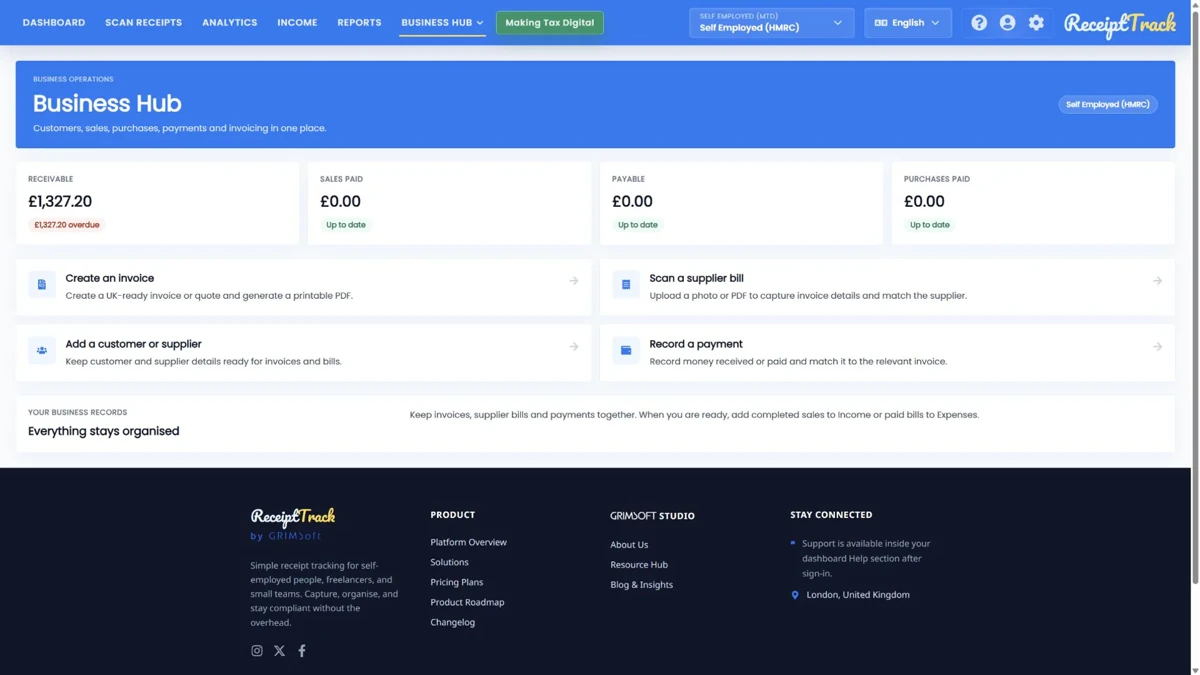
Invoices, payments and accounting entries are separate steps. Business Hub does not collect payments or submit these documents to HMRC. Mileage includes a posting preview, not an expense entry.
Available to owners of self-employed and company workspaces, including HMRC workspaces. Pro and Advanced include editing; Free and Starter are view-only. The optional 14-day Pro trial requires a card.
Frequently asked questions
Can I create invoices on the Free plan?
Free and Starter provide read-only Business Hub access. Pro and Advanced allow creating and editing. Existing records and ready files remain available after a downgrade; changing plan does not delete them.
Does Business Hub replace my accountant?
No. It helps organise operational evidence and supports explicit posting to Income or Expenses. You remain responsible for checking records and choosing suitable accounting treatment with professional help where needed.
Is Business Hub available in every ReceiptTrack app?
This page describes the web Business Hub. Check Download and the product documentation for the capabilities of each client; the presence of an Android or Windows download does not mean every web module is available there.