ReceiptTrack
Less invoice admin. More time for client work.
Keep quotes, client invoices and payment records organised with ReceiptTrack. Bring your freelance income and expense evidence together for month end.
From client agreement to invoice
Whether you design, consult or work on individual projects, keep a record of what was agreed and billed. Prepare a quote, then create the invoice with the customer and work details.
Record deposits and final payments
Match each payment to the client invoice. A deposit reduces the balance without marking the entire project as paid.
Keep your purchase evidence
Use receipt capture for everyday purchases and Business Hub for supplier invoices. Keep the original documents ready when you review your costs.
Invoice without starting from scratch
Reuse customer details and catalogue items for familiar work. Check the draft, issue the numbered invoice and download its PDF for your client.
Make month end easier to review
Check outstanding invoices, unmatched payments and supplier bills. Post reviewed entries to Income or Expenses before preparing records for your accountant.
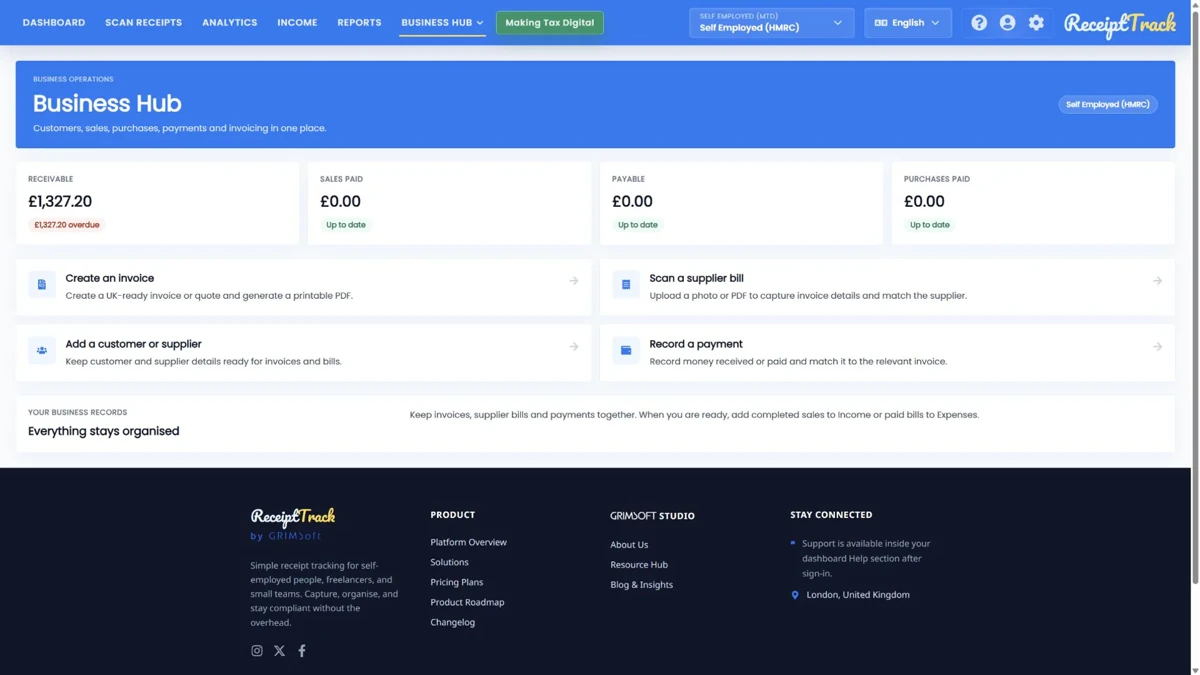
Invoices, payments and accounting entries are separate steps. Business Hub does not collect payments or submit these documents to HMRC. Mileage includes a posting preview, not an expense entry.
Available to owners of self-employed and company workspaces, including HMRC workspaces. Pro and Advanced include editing; Free and Starter are view-only. The optional 14-day Pro trial requires a card.
Frequently asked questions
Is freelance accounting software the same as a tax adviser?
No. ReceiptTrack helps organise documents and reviewed records. You remain responsible for the facts and accounting treatment; ask your accountant about decisions specific to your work.
Can I invoice automatically from tracked hours?
This Business Hub workflow does not include time tracking or automatic recurring invoicing. Review your line items and issue each supported document explicitly.
Where should a freelancer start?
Check plan access, select the correct business workspace and follow the Business Hub quickstart. Begin with one real workflow: a reviewed sales invoice, a supplier bill or a manual mileage claim.