ReceiptTrack
Know what is paid. See what is still due.
Keep issued invoices, supplier bills and payment records together. Check outstanding balances without searching through separate files.
One place to check your invoices
Find issued documents and their payment history in Business Hub. Review balances before following up with a customer or preparing your month-end records.
Track partial payments
Record a payment when it arrives and match it to the invoice. The remaining balance stays visible until the invoice is fully settled.
Keep issued records intact
Drafts can be edited before issue. Issued invoices retain their original details, with a full credit note available for a whole-invoice correction.
Give supplier bills the same attention
Review supplier invoices alongside their source documents. Approve the checked bill, then record and match payments to see what remains payable.
Prepare your month-end review
Check unpaid invoices and unmatched payments. Review each accounting entry before posting it to Income or Expenses, with a link back to the source.
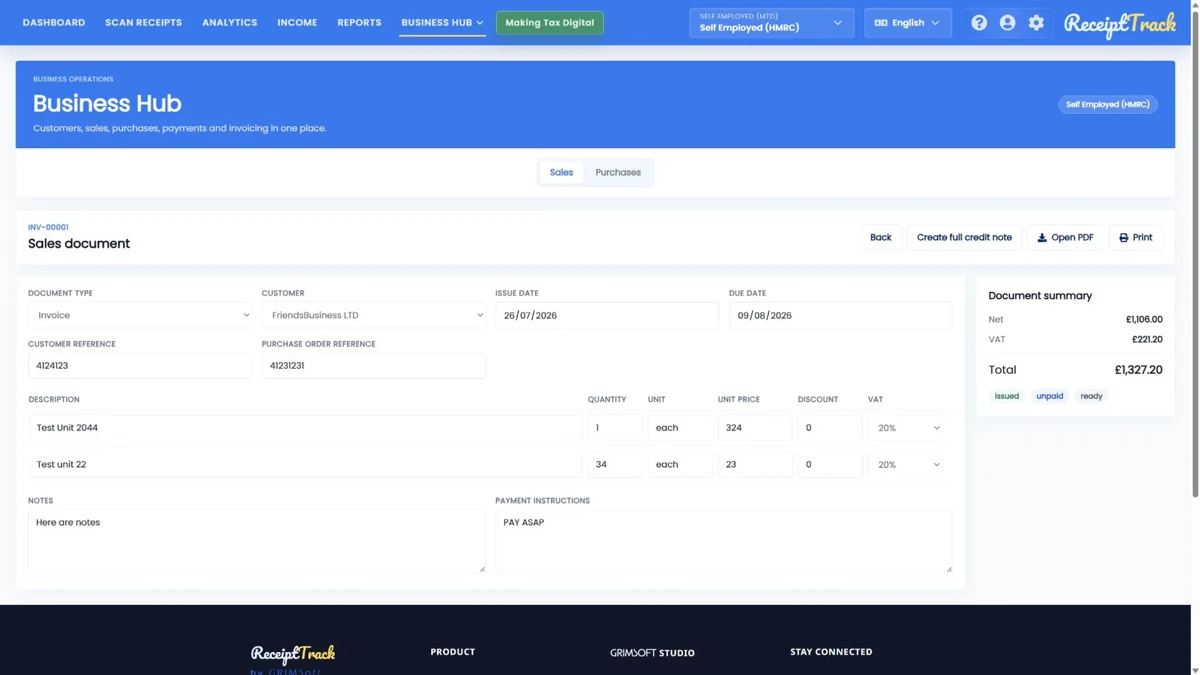
Invoices, payments and accounting entries are separate steps. Business Hub does not collect payments or submit these documents to HMRC. Mileage includes a posting preview, not an expense entry.
Available to owners of self-employed and company workspaces, including HMRC workspaces. Pro and Advanced include editing; Free and Starter are view-only. The optional 14-day Pro trial requires a card.
Frequently asked questions
How is this different from invoice creation?
The invoicing page explains drafting and issuing. Invoice management focuses on the later document trail: corrections, outstanding amounts, recorded payments, allocations and the accounting handoff.
Does ReceiptTrack chase customers or take payments?
This workflow records payments and their allocation. It does not promise automatic reminders, debt collection, payment processing or a bank feed.
Can I manage invoices on the Free plan?
Free and Starter provide read-only Business Hub access. Creation and editing require Pro or Advanced and an eligible business workspace owned by you. Existing pricing and trial terms apply.