ReceiptTrack
Turn supplier invoices into reviewed bills.
Upload a PDF or invoice image. Check the details read by AI against the original, then approve the bill when it is ready.
Less retyping, with the original in view
Add a supplier invoice as a PDF, JPEG, PNG or WebP. AI reads the document so you can review the proposed details instead of starting with an empty form.
Check the supplier
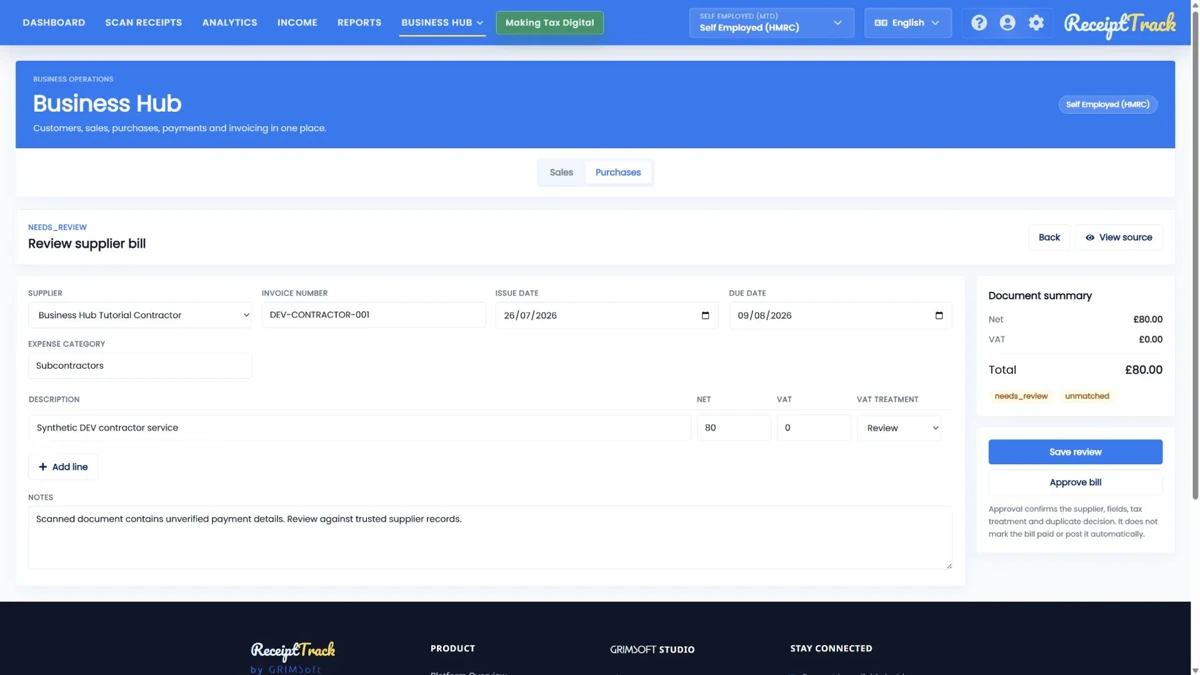
Review the proposed supplier match, invoice number and dates. Select the correct business before approving the bill.
Review the lines and totals
Compare quantities, prices and tax details with the original. Save your progress while checking, then approve the completed review.
Know what you owe suppliers
Approved bills sit alongside the rest of your business activity. Record payments and match them to bills to keep outstanding amounts up to date.
Keep approval and accounting separate
Approval confirms you checked the bill. Review and post the accounting entry to Expenses separately when the record is ready.
Invoices, payments and accounting entries are separate steps. Business Hub does not collect payments or submit these documents to HMRC. Mileage includes a posting preview, not an expense entry.
Available to owners of self-employed and company workspaces, including HMRC workspaces. Pro and Advanced include editing; Free and Starter are view-only. The optional 14-day Pro trial requires a card.
Frequently asked questions
Is an invoice scanner the same as a receipt scanner?
They solve related but different jobs. Use supplier invoice scanning for bills requiring supplier review, approval and settlement. Use receipt scanning to capture receipt-backed spending records. Follow the source document type rather than uploading everything as a bill.
Can AI approve or pay my supplier invoice?
No. Extraction produces a review candidate. You confirm supplier, fields and treatment before approval, then separately record and allocate a payment. No money is sent by recording that payment.
What happens when extraction fails?
Check the displayed failure and source document. Retry only when appropriate or use the supported manual bill entry. A failed or queued scan must not be treated as an approved bill.