ReceiptTrack
Create invoices for the work you do.
Prepare quotes and invoices with your business details, download numbered PDFs and keep a record of what your customers have paid.
An invoice that starts with your business
Add your business details and logo, choose a customer and describe the work. Reuse catalogue items when you invoice for the same products or services again.
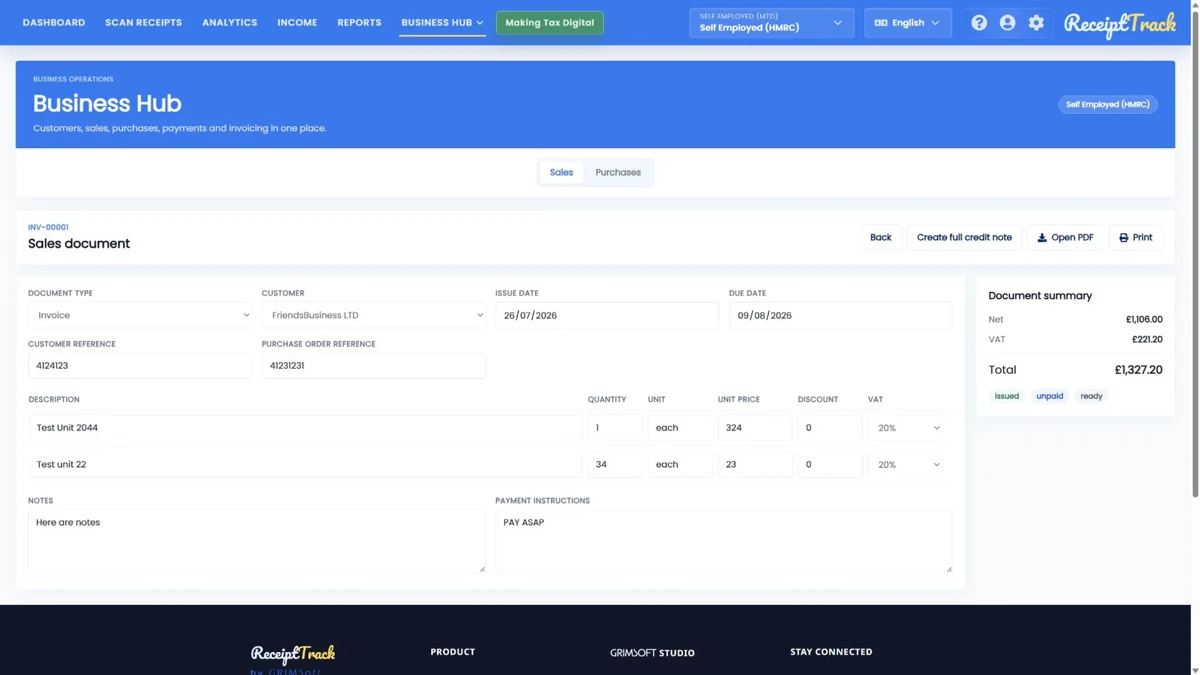
Review before you issue
Check dates, quantities, prices and tax treatment in the draft. Once issued, the numbered document keeps the details exactly as they were.
Download the issued PDF
When the PDF is ready, download or print it for your customer. The issued document remains available alongside its original details.
Keep the invoice and payment together
Record a customer payment and match it to the invoice. Part-payments leave a balance outstanding; issuing an invoice alone does not mark it paid.
Correct an invoice with a clear trail
Use a full credit note for a whole-invoice correction. The original stays on record, so you can see both what was issued and how it was corrected.
Invoices, payments and accounting entries are separate steps. Business Hub does not collect payments or submit these documents to HMRC. Mileage includes a posting preview, not an expense entry.
Available to owners of self-employed and company workspaces, including HMRC workspaces. Pro and Advanced include editing; Free and Starter are view-only. The optional 14-day Pro trial requires a card.
Frequently asked questions
Does ReceiptTrack email invoices to customers?
This workflow provides issued PDFs and print actions. Do not assume automated email delivery, a customer portal or online payment collection; use only delivery features explicitly available in your product version.
Can I edit an issued invoice?
An issued document keeps an immutable snapshot. Review before issuing and use the supported full credit note workflow for a whole-invoice correction. Editable drafts and issued records are different states.
Which plan lets me create invoices?
Pro and Advanced provide Business Hub create/edit access for eligible owner workspaces. Free and Starter are read-only. The optional Pro trial requires a card; existing prices and trial terms are listed on Pricing.